

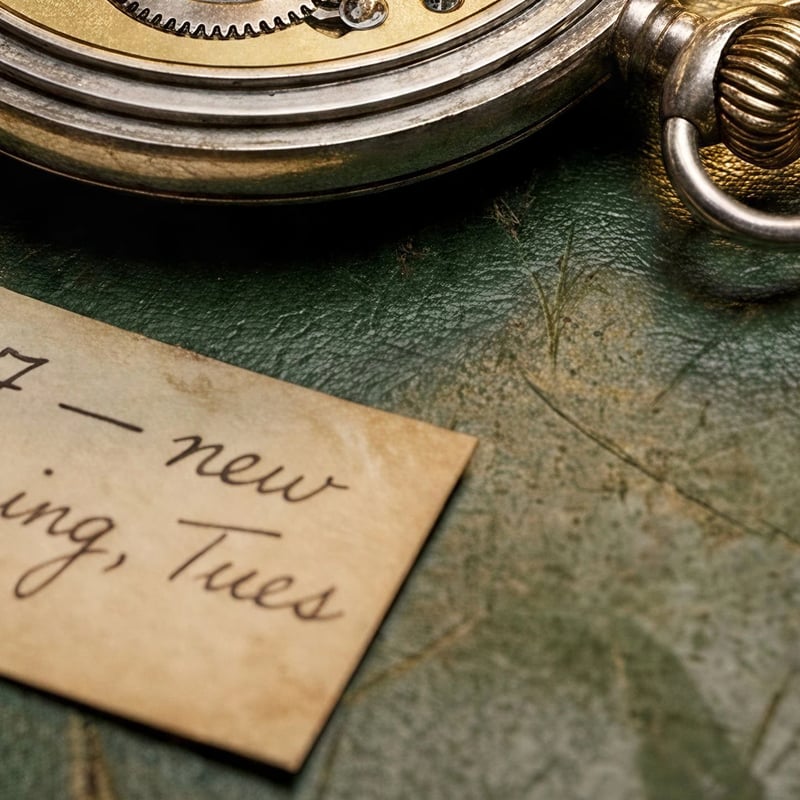

Enlarged with a plain resize, the 1K tag is soft and blurry; from the 4× upscale the handwriting and the paper edge are smooth and clean.
 Nano Banana Pro
Make a Nano Banana image 2x, 4x or 8x bigger without redrawing it. If you can still change the picture, Nano Banana Pro can also render it at 4K from the start; the comparison below shows both. Sign up and try it free.
Nano Banana Pro can make a bigger picture, but not of the same picture. It renders at 1K, 2K or 4K, so a prompt run at 4K comes out four times as wide as at 1K. Some people use Nano Banana Pro itself as a "creative upscaler": upload the image with a Nano Banana upscale prompt asking for a sharper, higher-resolution version. That can look good, but it is a new drawing of the scene, so details, faces and text can shift. An upscaler does the other job. It keeps every part of the picture where it is and enlarges it, sharpening edges as it goes. That is what the Nano Banana upscaler above does.
So the choice depends on whether the picture is finished. If you are still trying prompts, run the one you like at 4K. If you already have the exact image you want, upscale it.
For scale: a square Nano Banana Pro picture comes out about 1024 pixels wide at 1K, 2048 at 2K and 4096 at 4K, so upscaling a 1K picture 4× gets it to the width of a 4K render. To change what is in the picture, such as a hand, a face or a misspelled word, make a new Nano Banana Pro run first, then upscale the version you keep.
One prompt, a watchmaker's bench with a handwritten tag, ran on Nano Banana Pro at 1K and again at 4K; then the 1K picture was upscaled 4×.
Enlarged with a plain resize, the 1K tag is soft and blurry; from the 4× upscale the handwriting and the paper edge are smooth and clean.
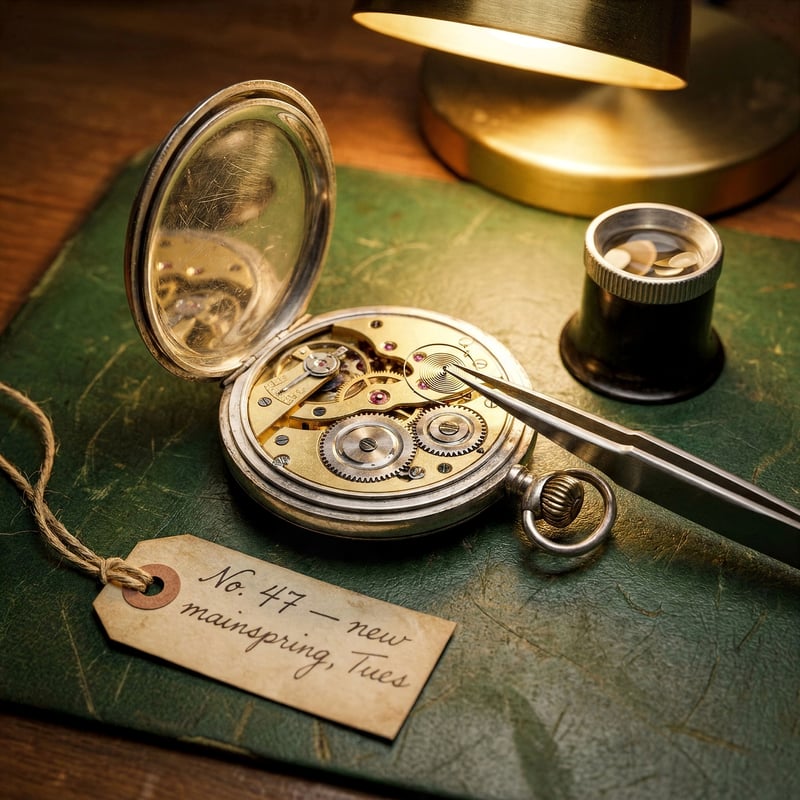
Same picture, 1024 × 1024 to 4096 × 4096 in 12 seconds. The tag still reads "No. 47 — new mainspring, Tues", letter for letter.
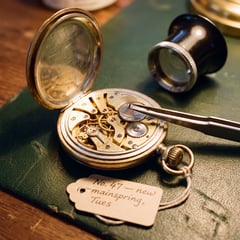
Both are 4096 × 4096, but the 4K run is a different picture: the watch is larger and the loupe and tag sit elsewhere. Same prompt, new composition. Rendering at 4K costs 25 credits against 20 at 1K, and the 4× upscale of the 1K picture costs 4. Pick native 4K while you are still choosing between versions; pick the upscale when this exact composition is the one you want.
Any picture works: a Nano Banana or Gemini image, a photo or a drawing.
2× is enough for most screens; pick 4× or 8× for print. The tool shows the size you will get before you start.
The result is ready in seconds and saved to your library, where you can download it or cut the subject out with the background remover.
Sizes are for a 1K (1024 px) Nano Banana image. Print sizes assume 300 pixels per inch: 4096 pixels is about 35 cm (13.7 in) on the long side.
| 2×Screens and listings | 4×Wallpapers and A4 prints | 8×Large prints | |
|---|---|---|---|
| From a 1K image | 2048 px | 4096 px | 8192 px |
| Good for | Screens, social posts, product listings | Wallpapers, prints up to about A4 at 300 dpi | Large prints and posters |
| Credits | 2 | 4 | 8 |
A 2× upscale costs 2 credits, 4× costs 4 and 8× costs 8. New accounts get 20 free credits when they sign up, so you can try it without paying, and upscaled images carry no watermark.
The upscaler keeps the picture as it is: in our test the handwritten tag read the same before and after a 4× upscale. Re-rendering at 4K with Nano Banana Pro is what changes things, because it makes a new picture.
Yes. It takes any image you upload, whichever model or camera made it: an old phone photo, a scan or a picture from another AI tool. Small or heavily compressed images gain less, because there is less detail to sharpen.
Cut the subject out of a Nano Banana image and download a real transparent PNG.
Turn a Nano Banana image into an 8-second clip with Veo 3.1 Lite.

12 tested Nano Banana Pro prompts to copy, each shown with the picture it made.