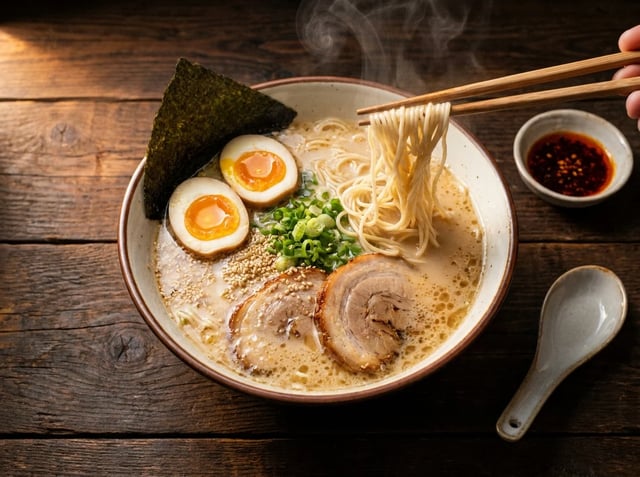

Nano Banana Pro Video Generator Nano Banana Image to Video Online
Make a Nano Banana Pro picture, then turn it into an 8-second video with Veo 3.1 Lite.
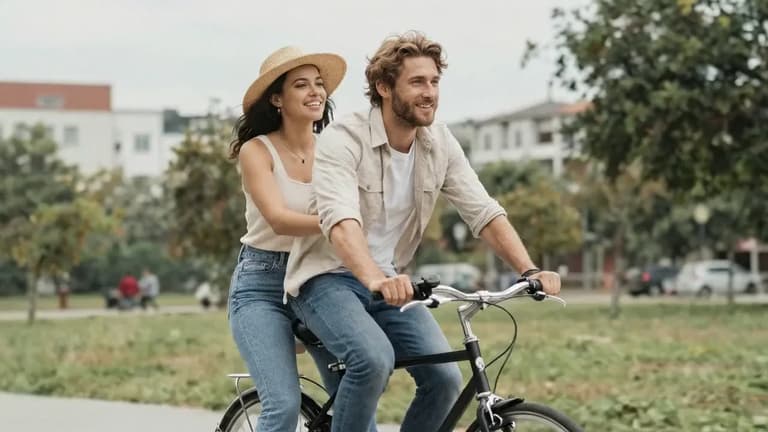

A couple sharing a bicycle glides slowly down a park path on a breezy afternoon. Camera pulls back in a wide tracking shot as they move through dappled light filtering through trees. The woman's hat brim flutters, she turns slightly to look at him. He smiles without looking back. Shallow depth of field, golden overcast sky, 24fps cinematic grade, quiet intimacy.
Can Nano Banana make videos?
Nano Banana makes the picture, a video model makes it move
No. Nano Banana, Nano Banana 2 and Nano Banana Pro are Google image models: they make and edit still pictures, and none of them returns a video file. When a site sells a "Nano Banana video generator", a separate video model is doing the moving part.
This Nano Banana Pro video generator works the same way, and says which model does it. You start from a picture, ideally one made with Nano Banana Pro on the homepage, and Veo 3.1 Lite, Google's video model, uses it as the first frame of an 8-second clip with sound. The picture sets the look, the people or objects and the light; your prompt sets what moves and how the camera behaves. If you want a different video model, the same generator offers Veo 3.1 Fast, Veo 3.1, Seedance 2 and others.
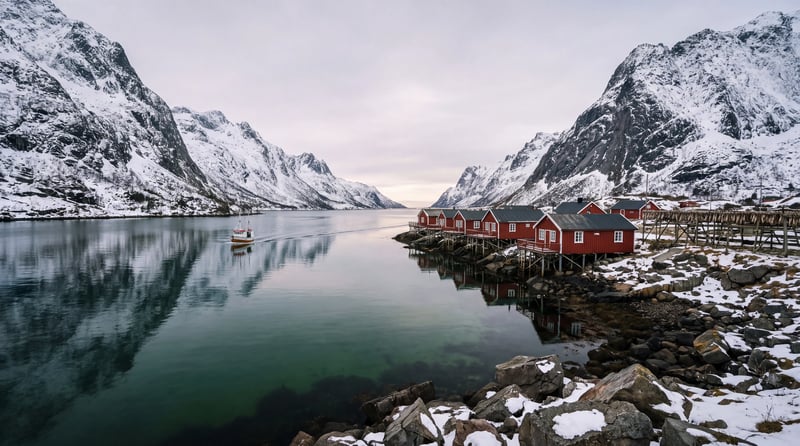
Nano Banana image to video: before and after
These three clips started from pictures Nano Banana Pro made for our homepage. Each ran once on Veo 3.1 Lite at 720p on November 14, 2026, and each cost 30 credits. Press Try this one to load the picture and the prompt into the generator above.
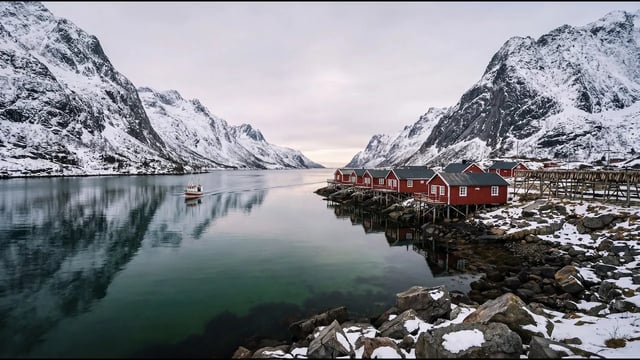
Motion prompt
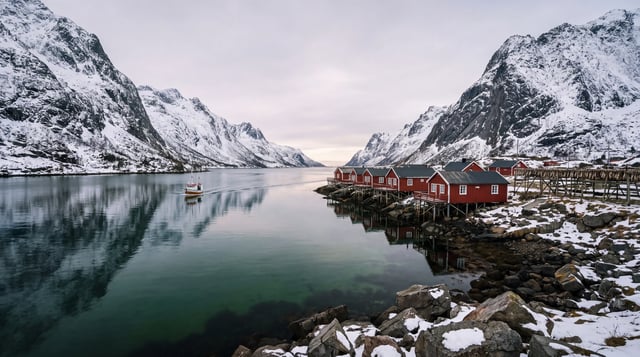
The small fishing boat moves slowly across the fjord, its wake spreading over the calm green water; a few light snowflakes begin to drift down. The camera pans gently to the right along the red cabins on stilts. Quiet water lapping, a distant boat engine and a few gulls.
Result
Ready after 88 seconds. The boat crosses the water with its wake, a gull flies through the sky and the camera drifts along the cabins. The snowflakes are faint.
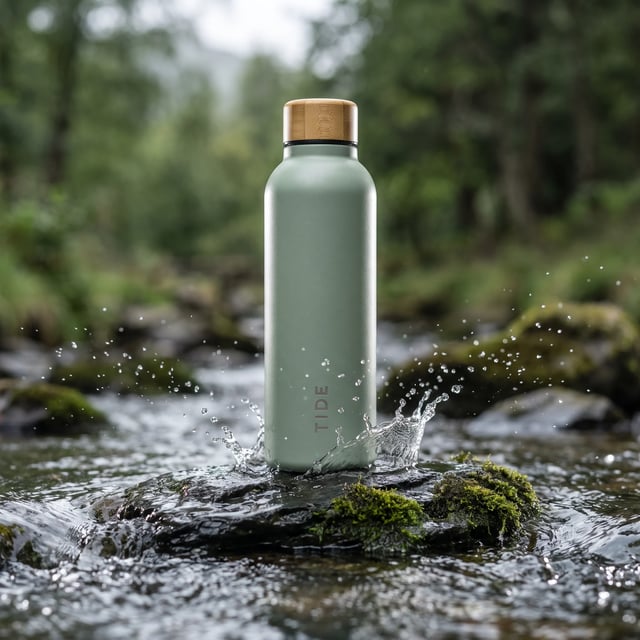
Motion prompt
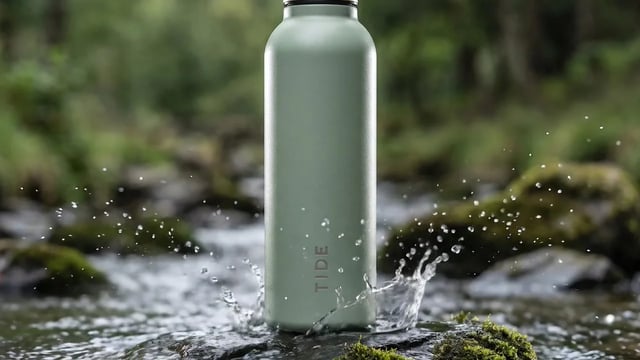
The mountain stream keeps flowing around the mossy rock; water splashes up around the base of the bottle and droplets fall back into the stream. The camera slowly pushes in towards the bottle. The bottle itself stays still and unchanged. Sound of running water.
Result
Ready after 64 seconds. The splash grows around the base and the bottle and its TIDE lettering stay steady. The picture was square, so the clip came back 16:9 and the cap is cropped off at the top.
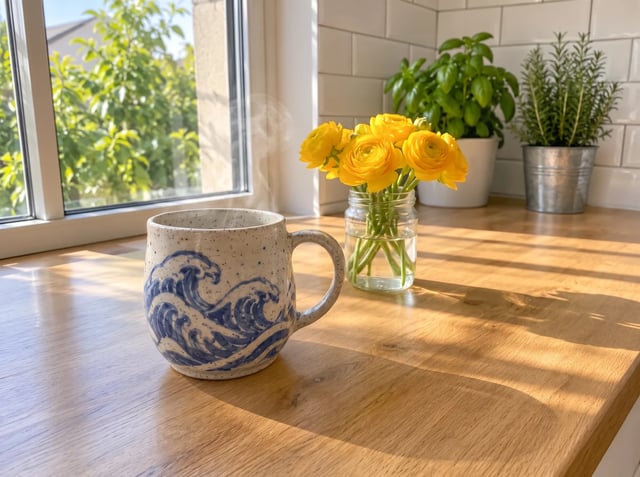
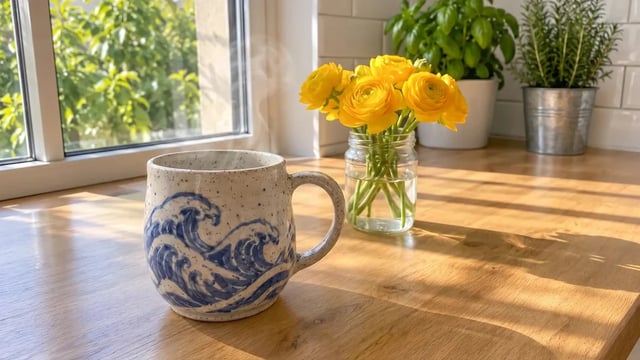
Motion prompt
Steam curls up from the mug, the leaves outside the window sway in a light breeze, and the patches of sunlight shift slowly across the oak counter. The camera pushes in slowly towards the mug. The mug, its wave pattern and the yellow flowers stay unchanged. Soft morning ambience, birds outside.
Result
A slow push-in on the mug; the painted waves and the flowers keep their shape. The steam is barely visible.
Video models that animate your Nano Banana images
Veo 3.1 Lite is the default because it is the cheapest way to get an 8-second clip with sound. The other models take the same picture; switch when you need something specific.
| Veo 3.1 LiteSelected in the generatorGenerate | Veo 3.1 FastTry | Veo 3.1Try | Seedance 2Try | |
|---|---|---|---|---|
| Clip length | 8 seconds | 8 seconds | 8 seconds | 4–15 seconds |
| Resolution | 720p, 1080p, 4K | 720p, 1080p, 4K | 720p, 1080p, 4K | 480p to 4K |
| Sound | Generated with the clip | Generated with the clip | Generated with the clip | Generated with the clip |
| Credits at 720p | 30 per clip | 60 per clip | 250 per clip | 45 per second |
| Pick it for | Trying ideas cheaply | Everyday clips | The most detail | Clips longer than 8 seconds |
Clips from the other video models here
Official samples from the other video models in this generator. Use template loads the prompt and switches to that model.
 Gemini Omni 1.2 Flash
Official sample
A quiet wildlife moment in one continuous shot. The kingfisher remains perched on the branch, breathing subtly as a breeze lifts the fine feathers along its chest. It slowly turns its head toward the stream, pauses, then tilts its head slightly as if tracking movement below. The droplet at its beak falls into the water, creating a small expanding ripple. The camera gently pushes closer while keeping the bird's entire body visible. Fern tips sway softly and thin morning mist drifts across the blurred stream.
 MiniMax H3 Max
Official sample
She is saying "I heard something. MiniMax H3 Max is here?.. Is that true?"
 MiniMax H3 Max Turbo
Official sample
Minimalist surreal advertising shot: a weathered bronze sculpture of Poseidon with heavy green verdigris patina, dark oxidation streaks and a wet sheen stands waist-deep in dark, near-black glossy water against a completely flat, saturated vermilion red background with no sky, horizon, or gradient. Wild curling hair, thick sculpted beard, muscular torso, soft diffused frontal lighting, subtle film grain, hyperrealistic 3D render, 16:9. The statue begins still with his head turned slightly off-camera and water rippling gently around the torso, then slowly turns his head to face the lens and raises the bronze trident in one deliberate motion, prongs pointing toward the upper-left corner, water streaming off the shaft. As the trident reaches its peak, his bronze lips move with full lip sync and he speaks, calm and commanding: "H3 Max Turbo. Faster than waves." Bold motion-graphics typography appears in the upper-right red negative space in a heavy clean sans-serif, off-white with a thin verdigris-green edge, each word landing exactly as it is spoken: "H3 MAX" snaps in with a hard scale punch and a quick tracking expansion, "TURBO" slams in below it slightly larger with a brief chromatic-glitch flicker, then the first two words cut away and "FASTER" sweeps in from the right with a fast motion-blur slide, followed by "THAN WAVES" rising from below with a subtle liquid-wave ripple distortion that settles into crisp letters. The stacked words hold for a beat, then dissolve in a fine spray of droplets as a ring of white splashes bursts outward from the water. Slow push-in from a medium shot to a medium close-up, low heroic angle, locked horizon, single continuous take with no cuts. Deep, gravelly male voice with a faint stone-hall reverb, low ocean rumble and lapping water underneath, a subtle metallic creak as the bronze moves, soft percussive whooshes and thuds synced to each text hit, no music.
 Wan 3.0
Official sample
5s Living Oil Painting | 16:9 | Impressionist Post-Painterly Texture | Sea-Cliff Wind and Scattering Blossoms FIRST FRAME: strictly preserve the reference image's original composition, palette, and brushwork. Nothing is re-rendered as photoreal — the animation must look like an oil painting in motion, visible impasto strokes and palette-knife ridges holding their identity as they move. SUBJECT: young dark-haired woman in a sage-olive long-sleeved blouse with a patterned sash, head tilted down and to her right, eyes lowered, expression calm and inward. Both bare forearms lift toward a great bundle of white chrysanthemum blooms breaking apart in the air before her. Face structure, hair mass, sleeve folds, and skin tone stay consistent throughout.
 Kling 4.0
Official sample
She lifts her coffee cup, smiles softly at the camera and tucks a curl behind her ear, gentle cafe ambience, slow push-in
 MiniMax H3 Max
Official sample
She spins. A woman in flowing ivory silk turns hard through a violent updraft of white feathers, her skirt flaring wide and heavy as it whips around her legs, sleeves snapping like sails. She throws her head back, hair breaking loose from its pins and streaming sideways, then drops her chin and opens her eyes — laughing. Her outstretched arms sweep down and across, carving visible channels through the feather storm, dragging spiral vortices behind her fingertips. Feathers explode outward on each rotation, some slamming against the lens, others caught and flung upward by the momentum of her skirt. She plants one foot, pivots, and reverses direction; the fabric lags a half-beat behind her body, then catches up and slams around her hips. The light surges from dim to blazing as the storm parts.
 Wan 3.0
Official sample
The dragon slowly opens its eyes, leaves move from its breathing, glowing particles float around the forest, the ranger slowly steps forward and reaches out a hand. The camera slowly circles around both characters revealing the enormous scale difference.
 Kling 4.0
Official sample
The photographer raises the camera and tries to get the dog to smile by shaking a toy. The dog remains completely serious. She tries a treat. The dog slowly adjusts its tie with one paw and continues staring directly into the camera. She lowers the camera in disbelief. The camera begins from her shooting position, then gently pushes toward the dog’s deadpan expression. Sophisticated visual comedy, realistic animal movement, polished studio lighting.
 Wan 3.0
Official sample
Heavy rain pours through the bamboo forest. The samurai slowly turns his head, then in one lightning-fast motion draws his katana and slices a falling bamboo leaf in half mid-air. Water sprays from the blade, leaves swirl around him. The camera pushes in from a low angle. Sound of rain, rustling bamboo and the sharp ring of steel.
 Wan 3.0
Official sample
The burner above the basket roars with a burst of flame, and the balloon rises gently over the canyon as dozens of colorful balloons drift in the golden sunrise. The woman leans on the basket edge, looks at the camera and says with a big smile: "Best morning of my life. Look at this view!" The camera slowly pulls back into a wide aerial shot of the canyon.
How to turn a Nano Banana Pro image into a video
Nano Banana image to video takes three steps here, and the first can happen on the homepage.
- 1
Pick your picture
Upload any image, or make one first with Nano Banana Pro on the homepage. Veo makes 16:9 or 9:16 clips, so start from a landscape picture, or pick 9:16 for a vertical one. Other shapes are cropped: our square bottle picture lost its cap.
- 2
Describe the motion
Say what moves, what stays still and what the camera does: "the boat crosses the fjord, the camera pans right". Naming things that must not change, like a product or its label, helps keep them steady.
- 3
Generate and download
Veo 3.1 Lite at 720p is selected; pick 1080p or 4K, or another model, if you need it. The cost shows on the button before you start. The clip lands in your library, ready to download.
Images that animate well
- 01
Product shots
Water, steam, fabric or light moving around a product that stays still. Ask the camera to push in slowly and say the product doesn't change.
- 02
Landscapes and travel
Water, clouds, boats and birds give the model natural motion to add, and a slow pan makes a still scene feel like footage.
- 03
Characters and mascots
One character in one pose works better than a sheet of several views. Describe a single action, like a wave or a turn of the head.
- 04
Cosy interiors and still life
Steam, candle flames, curtains and moving sunlight suit 8 seconds; keep the action small.
Pricing
A Veo 3.1 Lite clip costs 30 credits at 720p, 35 at 1080p and 150 at 4K. A Nano Banana Pro start picture costs 20 credits at 1K. The Basic monthly plan loads 1,000 credits, and credit packs start at 600.
Up to 500 images or 41 videos
- Up to 500 images
- Up to 41 videos
- All models, including Premium
Up to 1,250 images or 104 videos
- Up to 1,250 images
- Up to 104 videos
- All models, including Premium
Up to 3,750 images or 312 videos
- Up to 3,750 images
- Up to 312 videos
- All models, including Premium
· No card required
Failed runs are refunded automatically · Cancel anytime
Nano Banana video questions
Not on its own. Nano Banana Pro, like Nano Banana and Nano Banana 2, makes still images. Here you make the picture with Nano Banana Pro and a video model such as Veo 3.1 Lite turns it into a Nano Banana Pro video. Looking for a Nano Banana 2 video generator? A picture from Nano Banana 2 works the same way: upload it as the first frame.
Veo 3.1 Lite, Veo 3.1 Fast and Veo 3.1 make 8-second clips. For anything from 4 to 15 seconds, switch to Seedance 2 in the model menu.
An 8-second Veo 3.1 Lite clip costs 30 credits at 720p, 35 at 1080p and 150 at 4K. New accounts get 20 free credits, enough for a first Nano Banana Pro picture; clips are paid from a plan or credit pack, and the generator shows the cost before you start. If a clip is blocked by safety filters, the credits come back.
Yes. Upload any picture you have the right to use: a photo, a drawing or an image from Gemini. Google's filters decline some pictures, such as photos of children. Clips have no visible watermark, and clips made with a paid plan or credit pack can be used commercially.